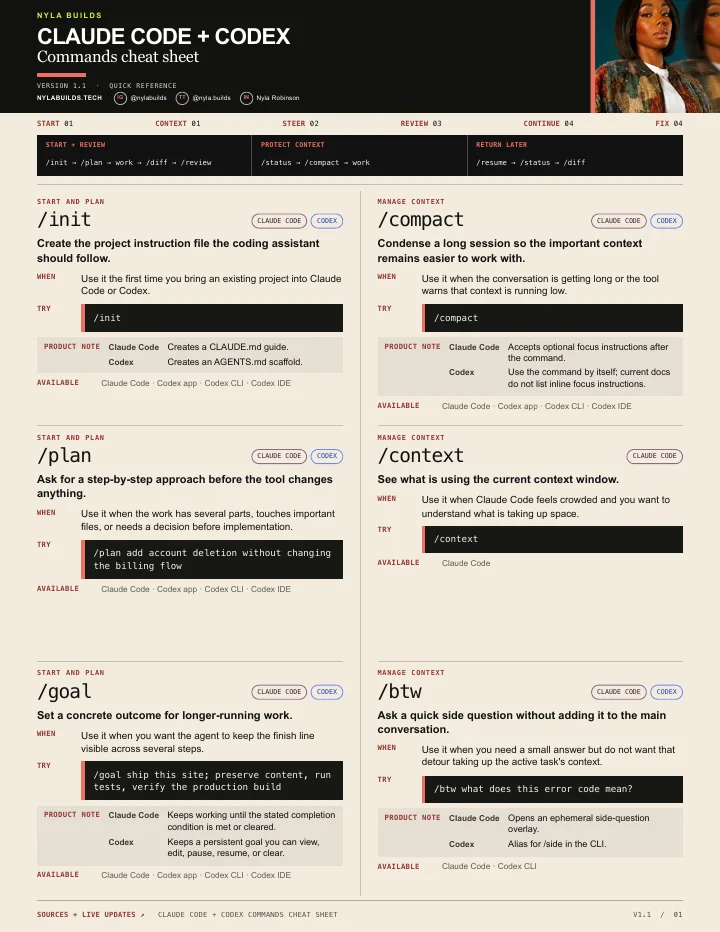
How to use this cheat sheet
Search for the job you are trying to do, or filter by Claude Code or Codex. Copy the command, then add the details the tool needs when the command accepts an instruction.
This is a curated reference, not a complete command list. Availability can vary by product surface, version, plan, workspace policy, and environment, so check the product help when a command is missing or behaves differently.
A clean start-to-review workflow
- Run /init once when the project still needs its instruction file.
- Use /plan before a change with several parts or important tradeoffs.
- Describe the result you want and let the tool work.
- Run /diff to inspect what changed.
- Use /review with the product-specific behavior shown below before you merge or ship.
When the conversation starts feeling crowded
- Use /context in Claude Code or /status in Codex to inspect the current session.
- Run /compact to summarize the conversation and free context. In Claude Code, you can add focus instructions naming the decisions and open problems that must survive.
- Use /clear when you need a truly fresh task instead of carrying the old conversation forward.
When you come back later
- Use /resume to reopen the saved session.
- Run /status to confirm the session details available on your surface.
- Use /diff before continuing so you know what is already changed.
Command group
Start and plan
/initCreate the project instruction file the coding assistant should follow.
- Use it when
- Use it the first time you bring an existing project into Claude Code or Codex.
- Example
/init- Documented surfaces
- Claude Code · Codex app · Codex CLI · Codex IDE
- Product notes
Claude Code: Creates a CLAUDE.md guide.
Codex: Creates an AGENTS.md scaffold.
/planAsk for a step-by-step approach before the tool changes anything.
- Use it when
- Use it when the work has several parts, touches important files, or needs a decision before implementation.
- Example
/plan add account deletion without changing the billing flow- Documented surfaces
- Claude Code · Codex app · Codex CLI · Codex IDE
/goalSet a concrete outcome for longer-running work.
- Use it when
- Use it when you want the agent to keep the finish line visible across several steps.
- Example
/goal ship this site; preserve content, run tests, verify the production build- Documented surfaces
- Claude Code · Codex app · Codex CLI · Codex IDE
- Product notes
Claude Code: Keeps working until the stated completion condition is met or cleared.
Codex: Keeps a persistent goal you can view, edit, pause, resume, or clear.
Command group
Manage context
/compactCondense a long session so the important context remains easier to work with.
- Use it when
- Use it when the conversation is getting long or the tool warns that context is running low.
- Example
/compact- Documented surfaces
- Claude Code · Codex app · Codex CLI · Codex IDE
- Product notes
Claude Code: Accepts optional focus instructions after the command.
Codex: Use the command by itself; current docs do not list inline focus instructions.
/contextSee what is using the current context window.
- Use it when
- Use it when Claude Code feels crowded and you want to understand what is taking up space.
- Example
/context- Documented surfaces
- Claude Code
/btwAsk a quick side question without adding it to the main conversation.
- Use it when
- Use it when you need a small answer but do not want that detour taking up the active task's context.
- Example
/btw what does this error code mean?- Documented surfaces
- Claude Code · Codex CLI
- Product notes
Claude Code: Opens an ephemeral side-question overlay.
Codex: Alias for /side in the CLI.
/statusShow the session details, context usage, and environment information available on the current surface.
- Use it when
- Use it to confirm which session you are in and see the configuration, context, or rate-limit details that surface exposes.
- Example
/status- Documented surfaces
- Claude Code · Codex app · Codex CLI · Codex IDE
- Product notes
Claude Code: Shows version, model, account, and connectivity.
Codex: The CLI shows the active model, approval policy, writable roots, and token usage; the app and IDE show the chat ID, context usage, and rate limits.
/clearStart a fresh conversation without leaving the current project.
- Use it when
- Use it when the next task should not inherit the current chat's context.
- Example
/clear- Documented surfaces
- Claude Code · Codex CLI
- Product notes
Claude Code: Starts empty context and keeps the previous conversation available to resume.
Codex: Clears the terminal and starts a new chat.
/usageCheck available usage information and limits.
- Use it when
- Use it when you need to understand current account usage, limits, or an available reset option.
- Example
/usage- Documented surfaces
- Claude Code · Codex CLI
- Product notes
Claude Code: Shows session cost, plan usage limits, and activity stats; supported plans also include feature breakdowns.
Codex: Shows daily, weekly, or cumulative token activity and, when available, lets you redeem an earned rate-limit reset.
Command group
Steer the session
/modelView or change the model used for the current work.
- Use it when
- Use it when you want a faster model for a small task or a stronger model for harder reasoning.
- Example
/model- Documented surfaces
- Claude Code · Codex app · Codex CLI · Codex IDE
- Product notes
Claude Code: Can change and save the default model, depending on how it is invoked.
Codex: Chooses the active model and available reasoning effort for the chat.
/permissionsReview or change what the assistant can do without asking first.
- Use it when
- Use it before sensitive work or when approval prompts are either too loose or too restrictive.
- Example
/permissions- Documented surfaces
- Claude Code · Codex CLI
- Product notes
Claude Code: Manages allow, ask, and deny rules for tools.
Codex: Switches the session's approval and access profile.
/mentionAdd a file to the conversation by typing part of its path.
- Use it when
- Use it when Codex needs a specific file and you do not want to paste its contents.
- Example
/mention app/api/contact/route.ts- Documented surfaces
- Codex CLI
/skillsBrowse the reusable skills available in the current environment.
- Use it when
- Use it when a repeatable workflow may already have instructions or tools ready to use.
- Example
/skills- Documented surfaces
- Claude Code · Codex CLI
/mcpInspect or manage Model Context Protocol connections.
- Use it when
- Use it when a connected tool is missing, disconnected, or needs authentication.
- Example
/mcp- Documented surfaces
- Claude Code · Codex app · Codex CLI · Codex IDE
- Product notes
Claude Code: Manages server state, reconnection, and OAuth.
Codex: Lists configured MCP tools and server details.
/memoryReview project memory files and Claude Code memory settings.
- Use it when
- Use it when persistent project guidance is missing, stale, or loading from the wrong place.
- Example
/memory- Documented surfaces
- Claude Code
Command group
Review work
/diffShow the changes made in the working project.
- Use it when
- Use it before accepting, committing, or handing off code changes.
- Example
/diff- Documented surfaces
- Claude Code · Codex CLI
/reviewAsk the tool to inspect code changes for defects and risks.
- Use it when
- Use it after implementation and before you merge or deploy.
- Example
/review- Documented surfaces
- Claude Code · Codex app · Codex CLI · Codex IDE
- Product notes
Claude Code: Runs a fast, read-only review of a GitHub pull request.
Codex: Reviews local changes or compares them with a selected base branch.
/copyCopy the latest completed response without selecting terminal text.
- Use it when
- Use it when you want to move a plan, answer, or code block into another document.
- Example
/copy- Documented surfaces
- Claude Code · Codex CLI
Command group
Continue and parallelize
/resumeReopen a previous coding session and continue from its saved context.
- Use it when
- Use it when you return to unfinished work instead of rebuilding the conversation from memory.
- Example
/resume- Documented surfaces
- Claude Code · Codex CLI
/forkBranch the current conversation so another direction can continue independently.
- Use it when
- Use it when you want to explore another approach without losing the current thread.
- Example
/fork- Documented surfaces
- Claude Code · Codex app · Codex CLI · Codex IDE
- Product notes
Claude Code: Copies the conversation into a background session.
Codex: Copies a local chat into a new local chat.
/tasksView and manage background work in the current Claude Code session.
- Use it when
- Use it to check running shells and subagents without interrupting the main task.
- Example
/tasks- Documented surfaces
- Claude Code
/psCheck background terminal processes and their recent output.
- Use it when
- Use it when a build, test, or server is still running in the background.
- Example
/ps- Documented surfaces
- Codex CLI
- Product notes
Codex: The list may be empty unless Codex started a supported background terminal in the current session.
/rewindReturn the conversation, the code, or both to an earlier checkpoint.
- Use it when
- Use it when a change or conversation turn took the project in the wrong direction.
- Example
/rewind- Documented surfaces
- Claude Code
Command group
Fix problems
/doctorRun a setup checkup and diagnose Claude Code configuration problems.
- Use it when
- Use it when installation, settings, plugins, skills, hooks, or permissions are behaving unexpectedly.
- Example
/doctor- Documented surfaces
- Claude Code
- Product notes
Claude Code: Reports findings first and asks before applying fixes; claude doctor outside a session prints read-only installation diagnostics.