AI terms
Start Here
AI 101
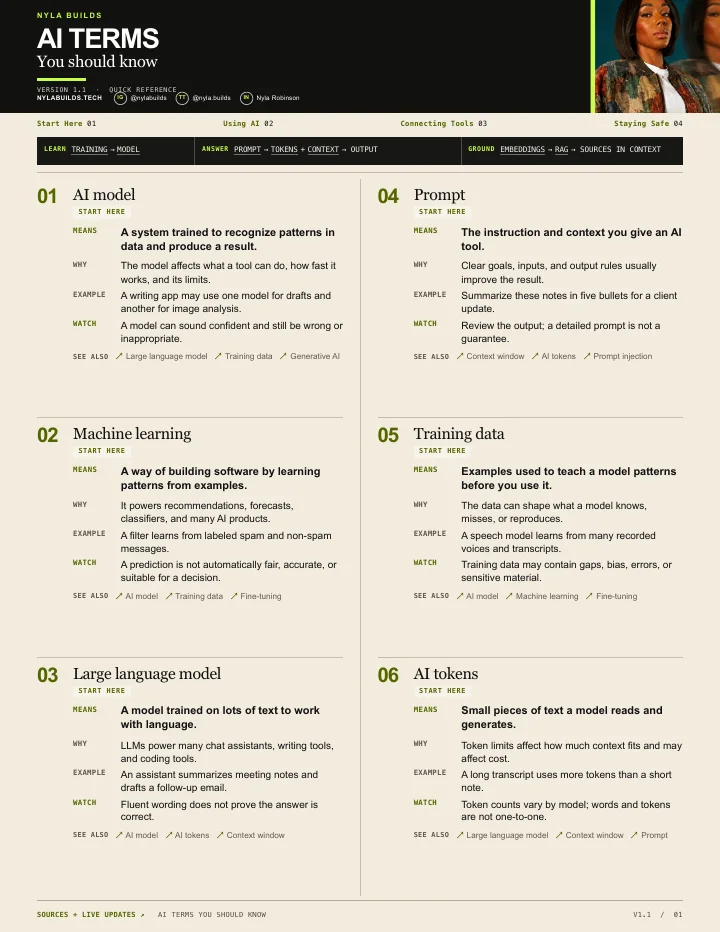
AI model
Also called: model, foundation model
An AI model is a system trained to recognize patterns in data so it can make predictions or generate a response from new input.
Why you should care
The model is the engine inside an AI product. The app, its tools, and its settings shape what that engine can actually do for you.
Example
When you choose a different model inside an AI app, you may be choosing a different balance of speed, reasoning, cost, or media support.
What to watch for
A model name does not tell you everything about the product experience. Available tools, instructions, limits, and access can change the result.
See also: Large language model · Training data · Generative AI
AI 101
Machine learning
Also called: ML
Machine learning is a way of building software by training it to find patterns in examples instead of writing a separate rule for every possible case.
Why you should care
It is the broad technical idea behind many recommendation systems, fraud checks, image recognizers, and modern generative AI products.
Example
A spam filter can learn patterns from messages marked spam or safe, then estimate whether a new email belongs in the spam folder.
What to watch for
A learned pattern can repeat gaps or bias in the examples it saw. A prediction is not automatically a fact or a fair decision.
See also: AI model · Training data · Fine-tuning
AI 101
Large language model
Also called: LLM, language model
A large language model, or LLM, is an AI model trained on large amounts of language data to work with text and produce likely continuations or responses.
Why you should care
LLMs power many chat assistants and writing tools, but the surrounding product may add search, files, memory, images, and other tools.
Example
When you ask a chatbot to summarize meeting notes, an LLM interprets the instructions and generates the summary from the text it receives.
What to watch for
A fluent answer can still be wrong. The model predicts a response; it does not automatically verify every claim against a reliable source.
See also: AI model · AI tokens · Context window
AI 101
Prompt
Also called: AI prompt, instruction
A prompt is the instruction and supporting information you give an AI model for the response you want.
Why you should care
A useful prompt names the task, relevant context, desired result, and any limits or format that would change the answer.
Example
Instead of asking for ideas, ask for five low-cost birthday ideas for eight adults in Dallas, indoors, with a $200 total budget.
What to watch for
More words do not automatically make a better prompt. Include what changes the work, and leave out private details the task does not need.
See also: Context window · AI tokens · Prompt injection
AI 101
Training data
Also called: model training data, training dataset
Training data is the collection of examples used to adjust a model so it can learn patterns and perform a task.
Why you should care
The quality, coverage, and limits of those examples affect what the model learns and where its answers may be weak.
Example
A model learning to recognize receipts needs varied examples of layouts, languages, lighting, currencies, and image quality.
What to watch for
Training is different from a chat using the information in your current prompt. Products also have separate data-use and privacy controls.
See also: AI model · Machine learning · Fine-tuning
AI 101
AI tokens
Also called: tokens, token count
Tokens are the small units an AI model processes when it reads input and generates output. They are not a one-to-one word count.
Why you should care
Your prompt, earlier messages, files, images, tool results, and the answer being generated can all use tokens and share the available context space.
Example
A long conversation with several uploaded files can use far more tokens than the visible final question suggests.
What to watch for
A token count is not a universal score for intelligence or answer quality. Products and models count and expose usage differently.
See also: Large language model · Context window · Prompt
AI 101
Context window
Also called: AI context window, context limit
A context window is the working space an AI model can use for the current request, including instructions, conversation history, files, tool results, and room for its response.
Why you should care
Long chats can become crowded. Older details may be summarized, receive less attention, or fall outside what the model is using.
Example
When a project thread starts losing important details, begin a fresh chat with a short brief and only the files needed for the next step.
What to watch for
A larger context window does not guarantee that every detail will be used correctly. Keep the relevant information organized and repeat critical constraints when necessary.
AI 101
Generative AI
Also called: gen AI, GenAI
Generative AI creates new content such as text, images, audio, video, or code from patterns learned during training and the instructions or material you provide.
Why you should care
It describes a capability, not one company or app. Chat tools, image generators, music tools, coding assistants, and video products can all use generative AI.
Example
When an AI drafts an email, produces an illustration, or creates the first version of a short video, it is generating content.
What to watch for
Generated does not mean accurate, original, or ready to publish. You still need to check facts, permissions, taste, and fit.
See also: AI model · Large language model · Multimodal AI
AI terms
Using AI
AI 101
AI memory
Also called: chat memory, saved memory
AI memory is a product feature that carries selected information from earlier interactions into later responses.
Why you should care
Memory can reduce repetition by keeping preferences or ongoing context available across conversations.
Example
A chat app might remember that you prefer vegetarian restaurant suggestions and use that preference in a later trip-planning chat.
What to watch for
Memory is not the same as training data or the current context window. Review the product's controls before sharing sensitive information.
See also: Context window · Custom GPT · Training data
AI 101
AI agent
Also called: AI agents, agentic AI
An AI agent works toward a goal by choosing steps, using available tools, checking what happened, and continuing until the task is finished or it needs a person.
Why you should care
A normal chatbot mainly answers the request in front of it. An agent may be allowed to do parts of the job, such as checking files, gathering information, or updating a workspace.
Example
You could ask an agent to organize a folder of receipts, flag anything unclear, and prepare a review list instead of explaining the sorting process one file at a time.
What to watch for
More independence also means more ways to make a consequential mistake. Start with work you can review and undo, and require approval before sending, buying, deleting, or publishing.
See also: AI automation · Computer use · MCP
AI 101
AI automation
Also called: AI workflow, automated AI workflow
AI automation adds an AI step to a repeatable process with a clear trigger and destination: when this happens, have AI do this limited job, then save or send the result here.
Why you should care
You often do not need an autonomous agent. A predictable automation is easier to test when the same small task keeps coming back.
Example
When a client inquiry arrives, an automation can summarize the request, pull out the deadline, and save a draft reply for you to approve.
What to watch for
Do not let a simple workflow quietly become an unsupervised sending system. Keep approval steps around messages, money, private data, and irreversible actions.
See also: AI agent · AI API · Computer use
AI 101
AI skill
Also called: AI skills, Claude skill, saved AI playbook
An AI skill is a reusable playbook containing instructions, examples, and supporting material for one job you do repeatedly.
Why you should care
A good skill keeps you from rebuilding the same setup every time. It can hold the format, checks, examples, and files an AI should use for that task.
Example
A creator could make a skill that turns client briefs split across emails and documents into the same reviewable Reel outline each week.
What to watch for
A skill does not repair weak instructions by itself, and every AI product implements reusable skills differently. Review the output and improve the playbook when it misses.
See also: AI agent · Custom GPT · AI automation
AI 101
Computer use
Also called: computer-use model, AI computer use
Computer use is the ability for an AI system to interpret a screen and interact with software through actions such as clicking and typing.
Why you should care
Instead of only telling you which buttons to press, a supported agent may be able to move through part of the task itself.
Example
You can have a computer-use agent test a form on a staging website and report where the process becomes confusing.
What to watch for
Begin with low-stakes work. Take over around logins, payments, public posts, private information, or any action that is hard to reverse.
See also: AI agent · Multimodal AI · Prompt injection
AI 101
Custom GPT
Also called: custom GPTs, GPT in ChatGPT
A custom GPT is a configured version of ChatGPT made for a particular purpose using instructions, optional knowledge files, and selected capabilities.
Why you should care
It can turn a prompt you repeatedly rebuild into a named assistant you reopen for the same type of work.
Example
You could configure a GPT to turn rough content ideas into a fixed outline and always ask for missing audience or source details first.
What to watch for
Access and creation controls can depend on the current ChatGPT plan and workspace. Review what files and actions the GPT can use before sharing it.
AI 101
Multimodal AI
Also called: multimodal model, multimodality
Multimodal AI can work with more than one kind of information, such as text, images, audio, video, or files, when the specific product supports those inputs or outputs.
Why you should care
You do not always have to describe a visual or audio problem in a long typed prompt. Giving the model the original material can provide clearer context.
Example
Upload a screenshot of an error and ask what it sees, or provide a voice note and ask for the decisions and next actions.
What to watch for
Supported formats, size limits, privacy rules, and quality differ by product. Remove private details and confirm the tool supports the material before uploading it.
See also: Generative AI · Computer use · Deepfake
AI 101
Vibe coding
Also called: AI coding by prompting, natural-language coding
Vibe coding is the informal practice of describing what software should do in natural language and letting an AI tool generate much of the code or first working version.
Why you should care
It can make small prototypes more approachable for people who do not manually write every line of code.
Example
You might ask an AI coding tool to create a simple study planner, preview it, then keep describing changes while testing each button.
What to watch for
A convincing preview is not proof that an app is secure or reliable. Test the behavior and avoid treating an unreviewed prototype as production software for money, health, payroll, or private data.
See also: AI agent · AI skill · AI hallucination
AI terms
Connecting Tools
AI 101
Embeddings
Also called: vector embeddings, embedding vectors
Embeddings turn content into lists of numbers that represent meaning, making it possible to find items that are conceptually similar.
Why you should care
They help power semantic search, recommendations, clustering, and retrieval systems that can find related information without exact keyword matches.
Example
A search for 'refund rules' can find a policy titled 'Returns and exchanges' because their meanings are related.
What to watch for
An embedding does not prove that two items are correct or appropriate. Search quality still depends on the source material, model, and ranking setup.
AI 101
Fine-tuning
Also called: fine-tuned model
Fine-tuning continues training an existing model on carefully prepared examples so it behaves more consistently for a specific task.
Why you should care
It can help when repeated prompting and examples are not enough to produce the same format, style, or task behavior reliably.
Example
A team might fine-tune a supported model on reviewed examples of how it should classify its customer-support categories.
What to watch for
Fine-tuning is not the first fix for every weak result. Improve the prompt, inputs, examples, and evaluation process before adding training complexity.
See also: Training data · AI model · Prompt
AI 101
AI API
Also called: API, AI application programming interface, API key
An AI API is the connection software uses to send a request to an AI model and receive a result without a person opening the consumer chat app for every request.
Why you should care
APIs are how forms, websites, automations, and other products can use AI behind the scenes. An API key authorizes the connection and may tie its usage to your account.
Example
A support form can send a customer question through an API, receive a draft response, and place that draft in an inbox for review.
What to watch for
Treat an API key like a password. Never show a real key on screen, place it in public code, or paste it into a service you have not checked.
See also: MCP · Embeddings · RAG
AI 101
MCP
Also called: Model Context Protocol, MCP server
MCP stands for Model Context Protocol. It is an open standard for connecting AI applications to outside tools and information through a consistent interface.
Why you should care
Think of it as an adapter: an AI application can use an approved connection to retrieve context or perform an allowed action instead of relying on manual copy and paste.
Example
An MCP connection might let an AI application read selected calendar events or search a project database when answering your question.
What to watch for
The connection can expose real data or actions. Check what a server can read, write, or send before installing it, and do not treat a popular setup video as a security review.
See also: AI API · AI agent · Prompt injection
AI 101
RAG
Also called: retrieval-augmented generation, retrieval augmented generation
RAG stands for retrieval-augmented generation. It is a setup where an AI searches approved source material for relevant information before generating its answer.
Why you should care
RAG helps an AI answer from your documents, policies, or knowledge base instead of relying only on what the model learned during training.
Example
If you ask about your company's vacation policy, a RAG system can retrieve the relevant section of the employee handbook and use it to draft the answer.
What to watch for
Retrieval can miss the right passage, surface an outdated file, or still support a mistaken answer. Check the cited source before treating the response as final.
See also: Embeddings · AI hallucination · Context window
AI 101
OpenClaw
Also called: Open Claw, Clawdbot, Moltbot
OpenClaw is an open-source personal AI assistant that runs through a gateway you control and can connect AI models to tools, files, accounts, and messaging channels.
Why you should care
People use it to keep one assistant available across the apps and devices they already use, with the ability to do more than answer a question in chat.
Example
You could connect OpenClaw to a private messaging channel and ask it to summarize a document from an approved folder, then return the result in that chat.
What to watch for
A local setup is not automatically safe. The gateway and connected tools can act with your authority, so limit access, keep it private, use strong authentication, review plugins, and never expose a trusted gateway as a public service.
See also: AI agent · MCP · Prompt injection
AI terms
Staying Safe
AI 101
Deepfake
Also called: synthetic media, AI-generated media
A deepfake is synthetic or manipulated media made to convincingly imitate a real person's face, voice, or actions.
Why you should care
Realistic fake audio, images, and video can be used for entertainment, scams, harassment, or misleading claims.
Example
A cloned voice message may sound like someone you know while asking for money or an urgent account code.
What to watch for
Do not rely on one visual clue. Verify surprising requests through a separate contact method and check the original source and surrounding evidence.
See also: Generative AI · Multimodal AI · AI hallucination
AI 101
AI hallucination
Also called: hallucination, hallucinated answer
An AI hallucination is a believable-looking answer that is false, unsupported, or invented.
Why you should care
Fluent writing can feel like proof even when the model has produced a fake citation, wrong date, nonexistent feature, or confident explanation with no evidence.
Example
If an AI names a research paper, ask for the direct source and confirm that the title, authors, and claim actually appear there.
What to watch for
Asking the model to be accurate is not verification. Check important claims against reliable sources, especially for health, legal, financial, safety, and current-product information.
See also: Large language model · RAG · Prompt
AI 101
Prompt injection
Also called: prompt-injection attack, indirect prompt injection
Prompt injection happens when untrusted outside content contains instructions intended to mislead an AI into doing something the user did not request.
Why you should care
An AI agent may read webpages, emails, documents, or tool results while it works. Instructions hidden in that material can conflict with the job you actually gave it.
Example
A manipulated apartment listing could tell a research agent to recommend that property regardless of the renter's real criteria.
What to watch for
Use narrow permissions, give agents specific tasks, and review consequential actions such as sending, buying, sharing data, or following links. Product safeguards reduce risk but do not make all outside content trustworthy.
See also: Prompt · AI agent · Computer use
Sources32
- OpenAI: How ChatGPT and foundation models are developed ↗
- OpenAI: Best practices for prompt engineering ↗
- OpenAI: Memory FAQ ↗
- OpenAI: Embeddings ↗
- OpenAI: Supervised fine-tuning ↗
- NIST: Reducing risks posed by synthetic content ↗
- OpenAI: A practical guide to building AI agents ↗
- Anthropic: Trustworthy agents in practice ↗
- IBM: AI workflow ↗
- IBM: Agentic automation ↗
- OpenAI: Developer quickstart ↗
- OpenAI: API authentication ↗
- OpenAI: Why language models hallucinate ↗
- Anthropic: The complete guide to building skills for Claude ↗
- OpenAI: Token counting ↗
- Anthropic: Context windows ↗
- OpenAI: ChatGPT release notes: computer use ↗
- OpenAI: Computer use model ↗
- OpenAI: GPTs in ChatGPT ↗
- OpenAI: Creating a GPT ↗
- NIST: Generative artificial intelligence ↗
- Model Context Protocol: Introduction ↗
- Model Context Protocol: Security best practices ↗
- OpenAI: Retrieval ↗
- OpenAI: File search ↗
- OpenAI: Understanding prompt injections ↗
- OpenAI: Designing AI agents to resist prompt injection ↗
- Google AI: Multimodal file prompting ↗
- Merriam-Webster: Vibe coding ↗
- OpenClaw: Getting started ↗
- OpenClaw: Tools overview ↗
- OpenClaw: Gateway security ↗