See the outfit idea before placing an order
ChatGPT's virtual try-on makes a generated image of clothing or accessories on your photo. It can help you picture a camel jacket with your jeans or compare an outfit idea. The image may alter the garment or your appearance, and it doesn't establish which size will fit. Shopping help.
OpenAI's October 1, 2026 release notes describe the shopping Try on control and mobile and web access. This guide was checked October 2; check the controls on your account rather than assuming every listing has reached you. Dated update.
The example below is OpenAI's fictional person wearing generated jacket variations. It's an illustration of the feature, not Nyla's photo, a sizing test, or evidence that a particular garment looks this way in person.
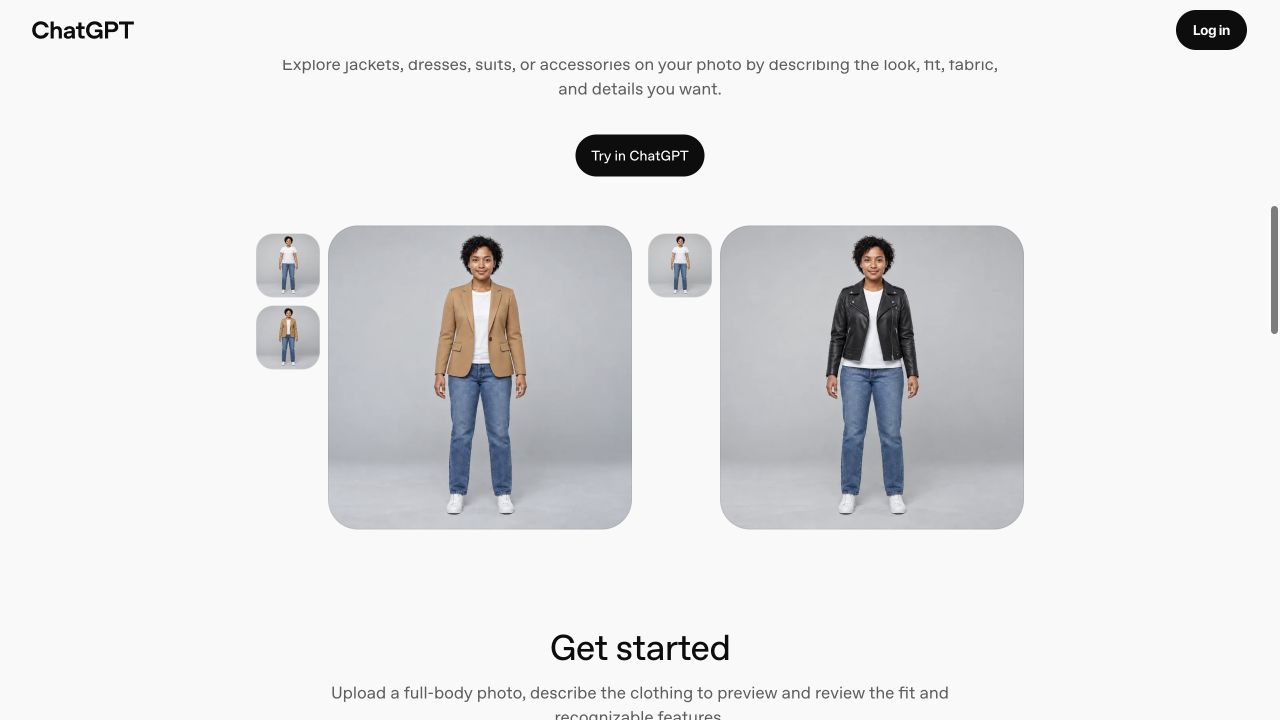
Start with the item you want to preview
1. Open a clothing or accessory listing in ChatGPT and select Try on if shown.
2. Take or upload a selfie.
3. Inspect the generated image. ChatGPT Images creates the preview. Try-on instructions.
Before starting, keep the merchant's item page open so you can compare the output with the actual product photos. For this first comparison, choose one garment and a photo you're comfortable uploading. A clear view of the person and the area where the garment goes makes the comparison easier to inspect. Use your own adult photo or one the person has agreed you may upload.
You can also start with a clothing picture
The help page also documents uploading a clothing or accessory image in a conversation and requesting a preview. This is a separate route from the listing button. Photo route.
For a controlled comparison, attach your photo and a clear image of one item, then use the prompt below. If the listing has no Try on button, this route may still be worth checking where your account supports images; it isn't a promise of identical shopping controls or account access.
Label which image is the person and which is the garment. Keep the background and other clothes steady so you can judge that one change.
Create an outfit visualization from these attached images.
Person image: [PERSON PHOTO].
Garment reference: [GARMENT IMAGE].
Item description: [ITEM DESCRIPTION].

Show the pictured garment on the person. Preserve the person's face, skin tone, body proportions, pose, and recognizable identity. Keep [OTHER CLOTHES, SHOES, AND BACKGROUND TO KEEP] unchanged. Match the garment's visible color, shape, length, closures, pockets, and pattern to the reference as closely as possible.

Do not reshape the body, retouch the face, or invent a different garment to make the outfit more flattering. If a required detail is missing or obscured, explain the uncertainty rather than claim it matches the product.

This is a styling visualization, not a measurement or size recommendation. Do not claim guaranteed fit, fabric behavior, or accurate sizing. I will compare the result with both input photos and check the merchant's measurements and return policy before buying.
A sample input
PERSON PHOTO = your consented full-body photo; GARMENT IMAGE = a merchant's front view of a camel single-breasted jacket; ITEM DESCRIPTION = camel jacket with two buttons and notch lapels; KEEP = white shirt, blue jeans, white shoes, pose, and background. This is a suggested input, not a test result.
Compare the person and garment with both inputs
OpenAI's outfit example recommends asking to preserve the person's face, proportions, pose, and identity, then reviewing the result. A request to preserve something still needs a visual check. Official outfit example.
Look at three things before keeping the preview:
The person: did the face, skin tone, body shape, or pose change?
The garment: did the color, length, pockets, buttons, print, or neckline drift from the item image?
The comparison: did the tool also change your jeans, shoes, lighting, or background, making the new outfit harder to judge?
If the jacket becomes a different design, you can't use that image to compare the pictured item. Try one focused correction, such as matching the original pockets while keeping the rest unchanged. If the output continues to change the person or item, set it aside. More attractive doesn't mean more faithful.
Choose the size from the merchant's information
OpenAI says try-on images don't guarantee size or fit and recommends checking merchant measurements, item details, and return rules. Fit limitation.
For that jacket, compare the merchant's stated measurements with your own measurements or a jacket you already own that fits. Read whether its chart lists body measurements or garment measurements before comparing numbers. Check the material, any stated stretch, and the return conditions for the exact item. If the merchant doesn't provide the detail you need, ask the merchant before buying.
The preview can support a styling question, such as whether you like that color combination. It can't resolve whether the shoulders will be comfortable, the sleeves will reach your wrists, or the fabric will feel the way you expect. Keep those questions open until the product information or an in-person try-on answers them.
Check the saved reference photo afterward
Reference photos are saved for later try-ons. Open Settings → Personalization → Reference photos to replace or remove one. Reference-photo controls.
Before uploading, crop out anything you don't want in the image, such as other people or details in your room. After the preview, check the reference-photo setting and decide whether you want the picture retained for another try-on. The documented delete control concerns the saved reference photo; this guide hasn't verified how it affects every other copy, chat, or generated image.
If the preview can't help you decide, you can stop there. Keeping the merchant's original photo and measurements gives you a firmer basis for the purchase than an image that keeps changing the jacket.